Time Travel Queries
Time travel in Apache Iceberg is the capability to query historical snapshots of a table at any point in its version history for auditing, debugging, and reproducible analytics.
By Alex Merced Last updated
The Need for Historical Data Access
Every data engineering team eventually faces a class of problem that traditional data systems handle poorly: the need to understand what data looked like at a specific moment in the past. These needs arise constantly in production environments.
A data scientist reports that a machine learning model’s predictions began degrading on March 15th. To diagnose the root cause, the team needs to query the training dataset exactly as it existed on that date, before any subsequent ETL jobs may have modified, corrected, or augmented it. In a traditional data lake where files are overwritten in place, that historical state simply does not exist anymore.
A financial auditor requires the exact balance sheet figures that the analytical database contained on December 31st at 11:59 PM, the values used to generate the annual report. Any corrections or late-arriving transactions processed after midnight would make today’s query return different numbers than those actually reported. The auditor needs the as-of-date view.
A data engineer deployed an incorrect transformation job that corrupted 6 months of historical revenue aggregates. The corrupted data was written over the correct historical records. The engineer needs to identify what the table contained before the bad job ran in order to restore the correct values.
Apache Iceberg’s Time Travel feature addresses all three of these scenarios through its snapshot-based versioning system. Every write to an Iceberg table creates an immutable, uniquely identified Snapshot. Time Travel queries navigate to a historical Snapshot and present the table as it existed at that moment, reading only the data files that were part of that snapshot.
Syntax and Query Mechanisms
Iceberg supports multiple mechanisms for specifying the historical version to query, each suited to different use cases.
Snapshot ID: Every Iceberg Snapshot has a unique 64-bit integer ID assigned at commit time. A query can specify a Snapshot ID directly to read the table as of exactly that commit. This is the most precise form of time travel, useful when the exact snapshot ID is known from an audit log or metadata query.
SELECT * FROM orders FOR VERSION AS OF 8756234987654321;Timestamp: More commonly, time travel queries specify a wall-clock timestamp, and Iceberg returns the Snapshot that was current at that time. If the specified timestamp falls between two Snapshots, Iceberg uses the Snapshot that was active immediately before the timestamp.
SELECT COUNT(*), SUM(revenue)
FROM sales_fact
FOR TIMESTAMP AS OF '2024-12-31 23:59:59';
Branch and Tag: Apache Iceberg supports named branches and tags, analogous to Git branches and tags. A data engineering team can create a named tag audit_2024_q4 pointing to the end-of-quarter Snapshot. Downstream queries can reference the tag by name rather than having to track the specific snapshot ID, making audit workflows reproducible and self-documenting.
SELECT * FROM sales_fact VERSION AS OF 'audit_2024_q4';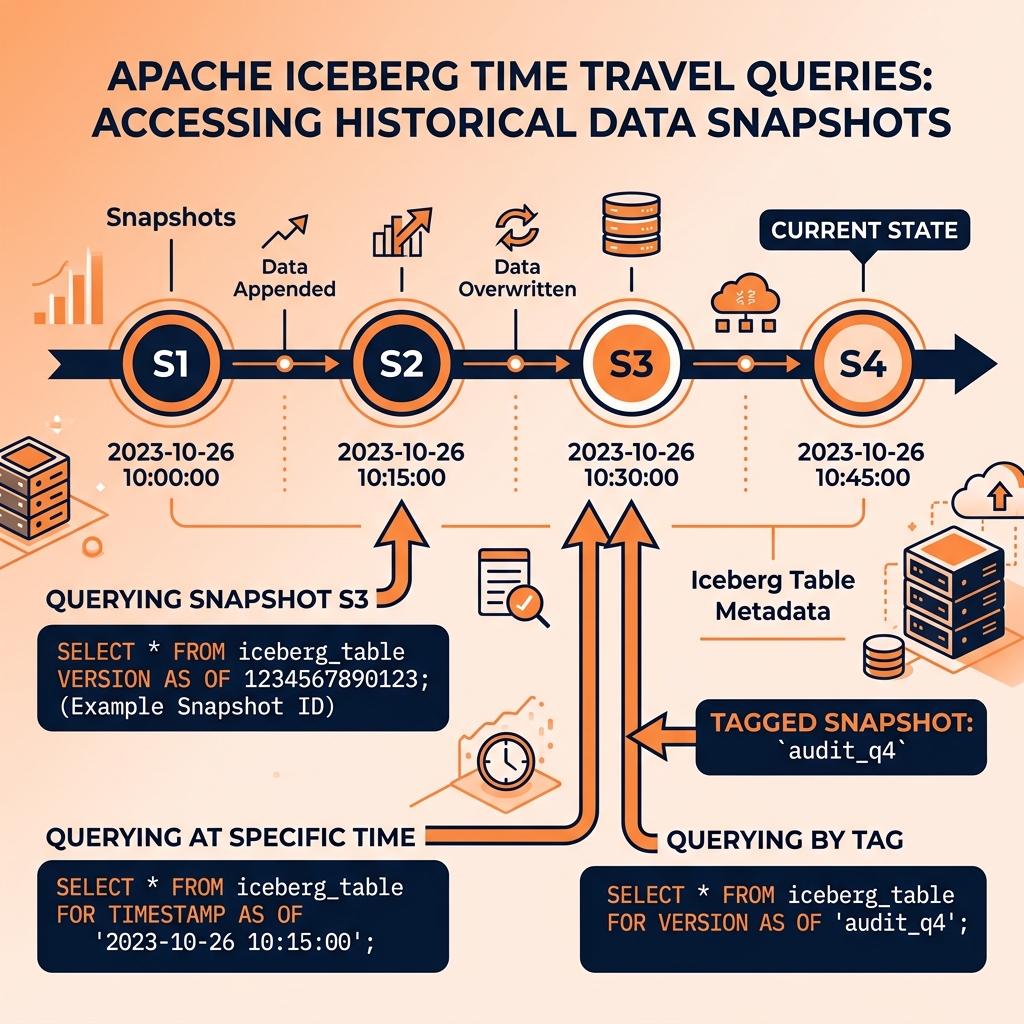
Practical Use Cases
Incremental Processing: Time travel enables efficient incremental data pipelines. Rather than tracking which records have changed since the last pipeline run through complex watermarking logic, a pipeline can query the difference between two Iceberg Snapshots directly. The tableChanges() API returns all records added, updated, or deleted between two snapshots, providing a clean, reliable incremental extraction mechanism.
Debugging and Root Cause Analysis: When data quality issues are discovered, time travel allows engineers to query the table at the exact moment a specific ETL job ran, compare the pre-job and post-job states, and identify exactly which records were modified incorrectly. This debugging capability that would take days of log analysis in traditional systems takes minutes with Iceberg’s time travel.
Model Reproducibility: Machine learning models must be reproducible. A model trained on data as of a specific date must be retrained on the exact same data when a bug in the training pipeline is discovered. With Iceberg time travel, the training dataset can be reconstructed exactly by querying the snapshot active at the original training date, regardless of how many subsequent transformations have been applied to the table.
Regulatory Compliance: Financial services, healthcare, and other regulated industries require the ability to demonstrate exactly what data was used to produce specific reports submitted to regulators. Iceberg’s snapshot-based time travel provides a durable, tamper-evident record of every historical data state that can satisfy regulatory audit requirements.
Snapshot Retention and Expiration
Time travel is only possible for Snapshots that have been retained. Retaining every Snapshot indefinitely would consume significant storage for the associated metadata and data files. Apache Iceberg provides the expire_snapshots procedure to remove old Snapshots and their associated unreferenced data files.
The typical retention policy balances time travel needs against storage costs. A common configuration retains all Snapshots from the last seven days (for operational debugging) and keeps only tagged Snapshots indefinitely (for regulatory audit requirements). Dremio’s Arctic (now Nessie-based) catalog management includes automated snapshot lifecycle management that enforces retention policies without requiring manual execution of the expire_snapshots procedure.
When Dremio queries Iceberg tables through its Semantic Layer, analysts can use time travel syntax in their SQL queries directly. This allows BI tools connected to Dremio to issue time travel queries transparently, without requiring direct access to the Iceberg metadata layer.
Learn More
For a longer treatment of this and the architecture around it, see the books by Alex Merced. You can also browse the rest of the knowledge base.