Snapshot Expiration
Snapshot expiration in Apache Iceberg is the table maintenance operation that removes historical snapshots and their associated data files to reclaim storage space while preserving configurable data retention windows.
By Alex Merced Last updated
The Hidden Cost of ACID History
Apache Iceberg’s ACID semantics are built on an append-only metadata model. Every write operation (INSERT, UPDATE, DELETE, MERGE, OPTIMIZE) creates a new snapshot that references a new set of data files. The old snapshot remains in the metadata, referencing the previous set of data files. This historical snapshot chain enables time travel and auditability but accumulates indefinitely if not managed.
A table receiving daily batch writes accumulates one new snapshot per day, with each snapshot referencing data files that may partially overlap with previous snapshots. A compaction operation adds additional snapshots (the pre-compaction and post-compaction states are separate snapshot versions). After six months of production operation without snapshot management, a table might have 180+ snapshots and thousands of data file references across the snapshot chain.
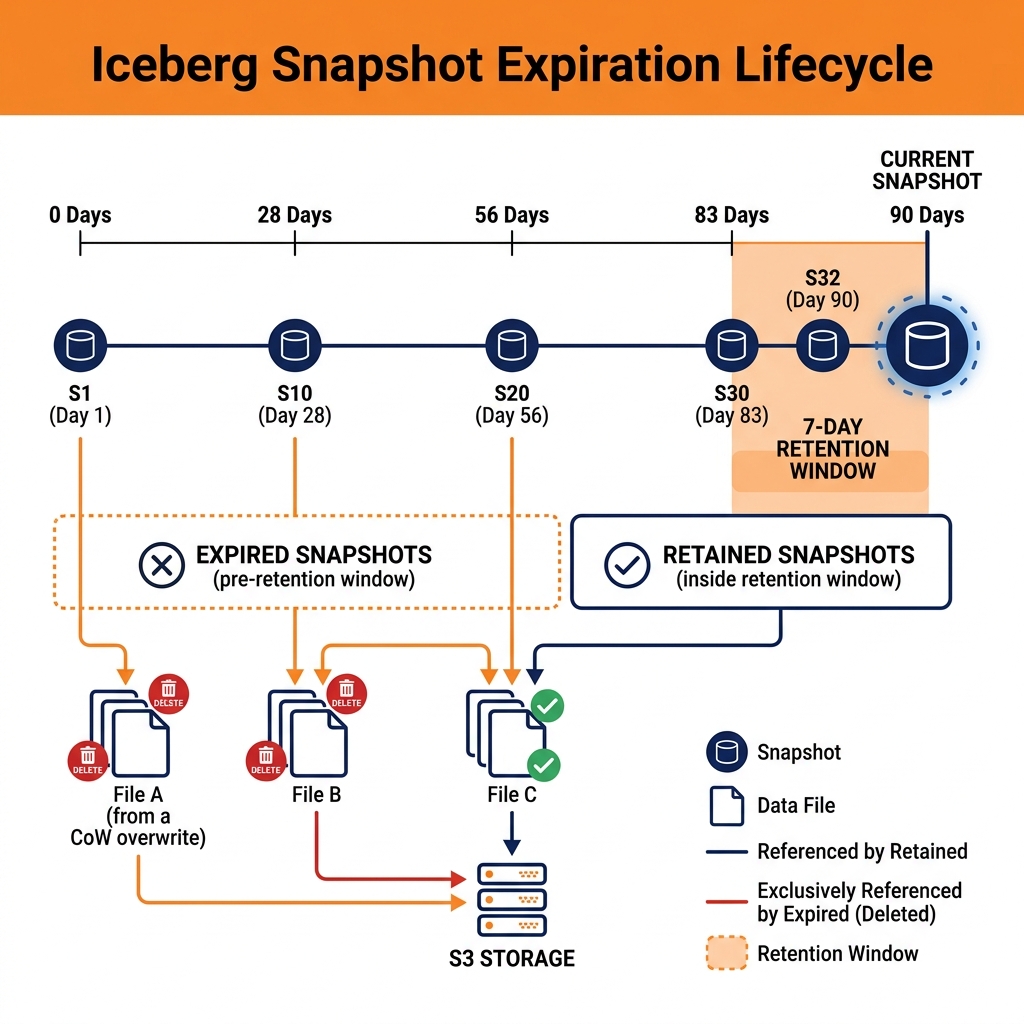
The storage cost of this historical accumulation has two components. The metadata storage cost is relatively small: snapshot and manifest files are compact Avro files. The data file storage cost is the dominant concern. When a MERGE INTO or DELETE operation updates rows in Iceberg’s Copy-on-Write mode, the original data files containing the old versions of those rows are no longer referenced in the current snapshot but remain on disk, referenced only by historical snapshots. These orphaned-in-practice data files continue to consume object storage until they are explicitly removed through snapshot expiration.
The expire_snapshots Procedure
Apache Iceberg provides the expire_snapshots stored procedure to clean up historical snapshots and their associated data files. The procedure accepts a timestamp or snapshot ID cutoff: all snapshots older than the cutoff are removed from the snapshot chain, and data files that are referenced only by the removed snapshots (not by any remaining snapshot) are deleted from object storage.
The expiration operation is atomic and safe: no currently active snapshot (or any snapshot newer than the cutoff) will have any of its data files deleted. The procedure only deletes files that are exclusively referenced by the expired snapshots, ensuring that the current table state and all retained historical states remain fully intact.
A typical snapshot expiration policy retains snapshots for 7 days (enabling time travel up to one week back) and expires older snapshots. This policy is specified as: CALL catalog.system.expire_snapshots('database.table', TIMESTAMP '2024-01-15 00:00:00', 100) where the timestamp is the cutoff date and 100 is the maximum number of snapshots to expire per call (avoiding timeouts on very old tables).
Orphan File Cleanup
A complementary maintenance operation to snapshot expiration is orphan file cleanup. In some failure scenarios (crashed write jobs, network interruptions during large writes), data files may be written to object storage but never referenced in any Iceberg snapshot. These orphan files consume storage indefinitely, as no snapshot expiration will remove them (they are not referenced by any snapshot).
Iceberg’s remove_orphan_files procedure scans the metadata layer to identify all file paths referenced by any snapshot, then scans the corresponding object storage locations to find files not referenced by any snapshot. Files older than a configurable grace period (defaulting to 3 days) that are not referenced by any snapshot are considered orphans and deleted.
The grace period is important: very recent data files may be in the process of being committed to a snapshot by an in-progress write operation. Deleting these files before the write completes would corrupt the in-progress transaction. The 3-day grace period provides sufficient time for any reasonable write operation to complete.
Dremio’s OPTIMIZE TABLE command in Dremio Cloud performs compaction, statistics refresh, and snapshot expiration in a single coordinated operation, simplifying the maintenance workflow for Dremio-managed Iceberg tables.
Learn More
For a longer treatment of this and the architecture around it, see the books by Alex Merced. You can also browse the rest of the knowledge base.