Write-Audit-Publish (WAP)
The Write-Audit-Publish pattern in Apache Iceberg is the branch-based data quality workflow that writes new data to an isolated branch, validates it, and atomically publishes it to the main branch only when quality checks pass.
By Alex Merced Last updated
The Risk of Directly Writing to Production
Traditional data pipeline architectures write new data directly to production tables. When a data quality issue exists in the incoming data (a schema mismatch, a source system bug that corrupted a column, a transformation error), that bad data lands directly in the production table where analysts and dashboards immediately see it. The remediation path requires identifying the bad data, running corrective pipelines to fix or remove the affected rows, and communicating to all consumers that the data was temporarily incorrect.
This “write first, fix later” model puts the burden of data quality on the consumer: consumers must be vigilant about data freshness and quality, build defensive logic in their queries, and tolerate periodic data quality incidents. For financial reporting, regulatory compliance, and customer-facing analytics, this model is unacceptable.
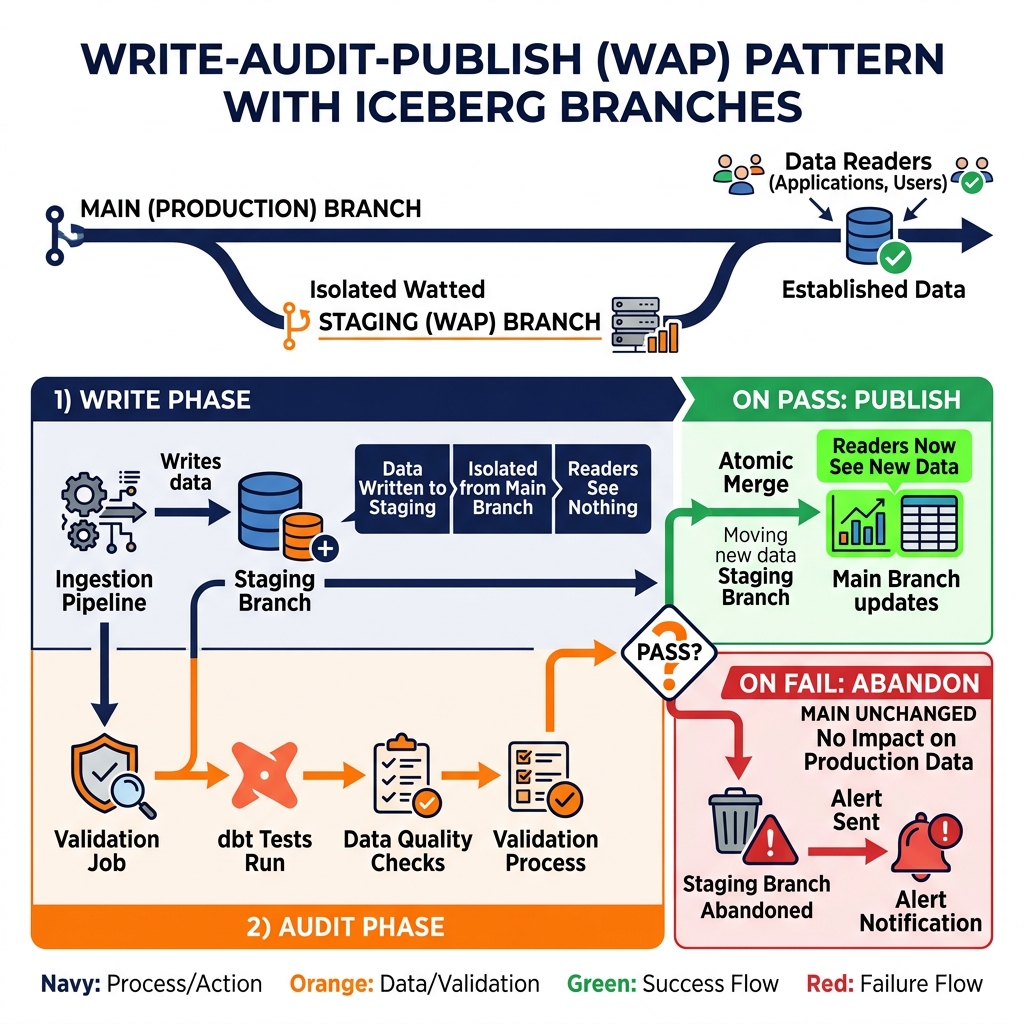
The Write-Audit-Publish (WAP) pattern is a data quality workflow built on Apache Iceberg’s table branching capability that inverts this model: new data is written to an isolated staging branch, validated against quality rules, and only published to the main production branch after passing all quality checks. Production consumers never see unvalidated data.
The Three Phases of WAP
Write phase: The data pipeline writes new records to an Iceberg table on a staging branch (typically a named branch like staging or audit-2024-01-15). Writing to a branch creates a new branch-specific snapshot that is completely invisible to readers of the main branch. Production queries against the main branch continue reading the last-known-good snapshot; they are entirely unaffected by the in-progress write.
Audit phase: After the write completes, the pipeline triggers a validation job (dbt tests, Great Expectations checks, custom SQL assertions) against the staging branch. The validation job queries the staging branch to inspect the newly written data, checking row counts, null rates, referential integrity, value distributions, and any other applicable quality rules. The validation results are recorded.
Publish phase: If all validation checks pass, the pipeline publishes the staging branch to the main branch through an atomic Iceberg branch merge. The new snapshot becomes the current main branch snapshot, and all readers immediately see the validated data. If any validation check fails, the staging branch is abandoned (or retained for debugging). The main branch retains its last-known-good state and production readers are never exposed to the invalid data. An alert is generated and the pipeline engineering team investigates the quality failure.
Implementing WAP with Iceberg
Apache Iceberg’s branching API (available through Spark and the Iceberg REST Catalog) provides the technical foundation for WAP. A named reference (branch) in Iceberg is a pointer to a specific snapshot, with its own independent commit history that does not affect the main branch.
Creating a WAP staging branch in Spark: ALTER TABLE catalog.db.table CREATE BRANCH staging_20240115. Writing to the branch: set spark.wap.branch = staging_20240115 in the Spark session configuration, then execute the normal write job. All writes in this session target the staging branch. After validation, publishing: ALTER TABLE catalog.db.table FAST FORWARD BRANCH main TO BRANCH staging_20240115.
The WAP pattern integrates naturally with Airflow orchestration. The Airflow DAG chains: Write Task (target staging branch) -> Audit Task (validate staging branch) -> Publish Task (merge to main) with conditional logic that skips the Publish Task and triggers an alert task when the Audit Task reports failures.
Learn More
The books by Alex Merced go further on this topic and the systems it sits inside. Short video explainers cover the same ground in under a minute each.