Bloom Filters in Parquet
Parquet bloom filters are a probabilistic data structure embedded in Parquet files that enables point lookup queries to skip entire row groups containing no matching values for high-cardinality columns.
By Alex Merced Last updated
The Limits of Min/Max Statistics
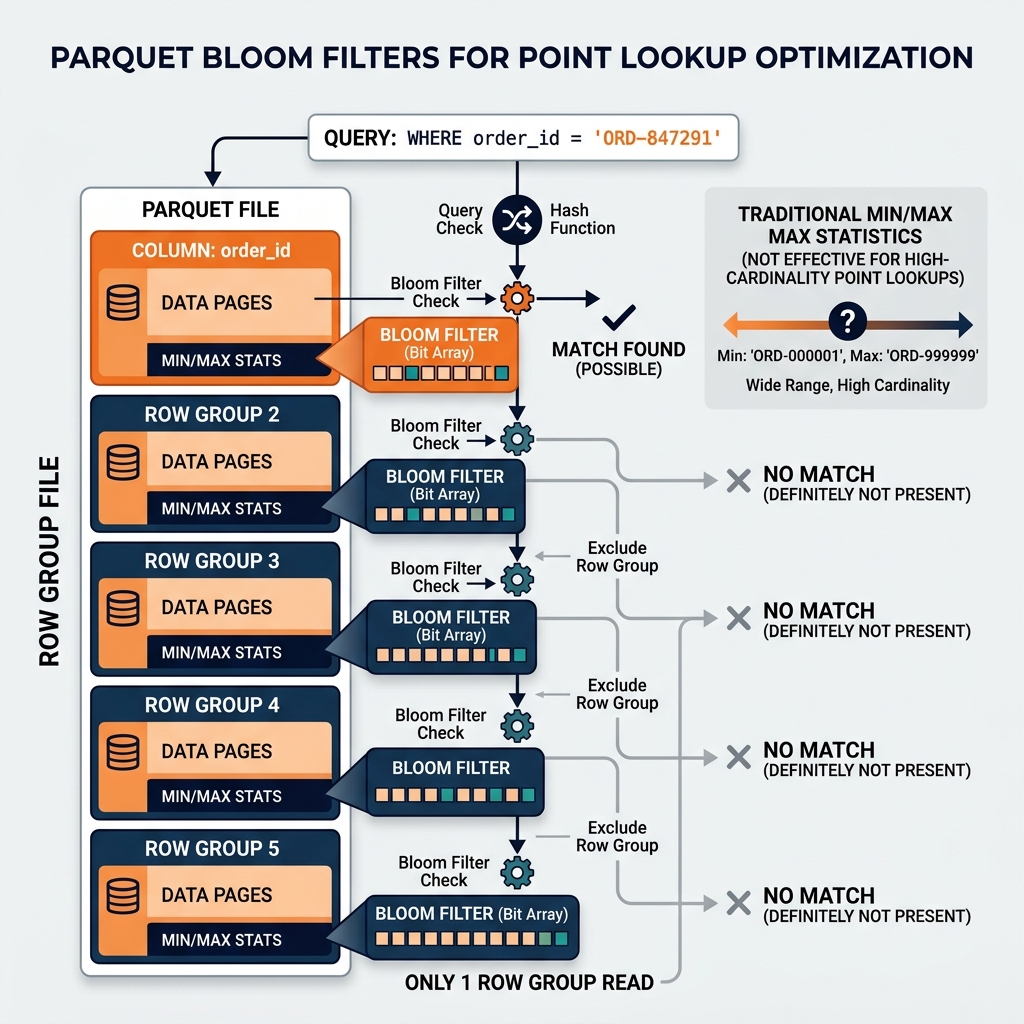
Parquet’s row group-level min/max statistics are powerful for range queries. A query filtering WHERE event_date BETWEEN '2024-01-01' AND '2024-01-31' can use min/max statistics to eliminate row groups whose entire date range falls outside the query window. But min/max statistics are ineffective for point lookup queries on high-cardinality columns. A query filtering WHERE order_id = 'ORD-847291' cannot use min/max filtering effectively because the min/max range for any row group containing many orders spans most of the order ID value space, so almost every row group has a min/max range that includes the target value.
Bloom filters address this gap. A bloom filter is a probabilistic data structure that can definitively answer whether a specific value is absent from a set (false negative rate = 0%) or probabilistically answer whether a value is present (some false positive rate, configurable). For the WHERE order_id = 'ORD-847291' query, a bloom filter on the order_id column tells the reader definitively whether ‘ORD-847291’ could possibly be in this row group. If the bloom filter says “no,” the row group is skipped with certainty. If the bloom filter says “maybe,” the row group is read and row-level filtering applied.
The Parquet 2.0 specification (Apache Parquet format version 2) introduced bloom filter support as an optional column metadata feature. When a Parquet file is written with bloom filters enabled for specific columns, the writer computes a bloom filter for each row group and each bloom-filter-enabled column and embeds the filter data in the file’s metadata section.
Bloom Filter Construction
A bloom filter for a row group is constructed by iterating over every value in the bloom-filter-enabled column for that row group and hashing each value into a bit array. The bit array size is configured based on the expected number of distinct values and the desired false positive rate. A larger bit array produces lower false positive rates but consumes more storage. Parquet’s bloom filter implementation uses a configurable false positive probability (typically 1%) to determine the bit array size.
For an order_id column with 50,000 distinct values per row group and a 1% FPP target, the bloom filter bit array requires approximately 60,000 bytes (60KB). This metadata overhead is small relative to the row group data size (typically 128MB) but provides the ability to skip the entire 128MB row group for any order ID not present in the row group.
When Bloom Filters Help Most
Bloom filters provide the largest query performance improvement for:
Point lookups on unique or near-unique columns: Queries that filter on primary key or unique identifier columns (order IDs, user IDs, transaction IDs, device serial numbers) where the min/max range spans most of the value space and max/max filtering provides minimal pruning.
Equality filters on high-cardinality categorical columns: Queries filtering on columns with many distinct values (product SKUs, geographic codes, customer segment IDs) where min/max filtering is ineffective.
Needle-in-a-haystack queries: Queries looking for a specific rare value in a large dataset, where the value is present in only a tiny fraction of row groups.
Bloom filters provide less benefit for range queries (where min/max statistics are already effective), low-cardinality columns (where partition pruning already eliminates most files), and queries that must read most of the data regardless of filtering (full table scans for aggregations).
Dremio’s query planner reads Parquet bloom filter metadata when available and uses it to make row group skip decisions. When querying Iceberg tables with Parquet files written with bloom filter support, Dremio automatically uses the bloom filter metadata for compatible filter predicates, reducing I/O for point lookup queries without any user configuration.
Learn More
For a longer treatment of this and the architecture around it, see the books by Alex Merced. You can also browse the rest of the knowledge base.