Column Masking
Column masking in data lakehouses is the data governance technique that dynamically replaces sensitive column values with masked representations based on the querying user's authorization level.
By Alex Merced Last updated
Protecting Sensitive Data in Shared Tables
Enterprise analytical tables frequently contain a mixture of non-sensitive business metrics and highly sensitive personal or financial data. A customer transaction table might contain columns like transaction_date, product_category, and revenue_amount that are freely shareable with the analytics team, alongside columns like customer_email, credit_card_last_four, ssn_hash, and home_address that require strict access controls to comply with GDPR, PCI-DSS, and HIPAA regulations.
The naive access control approach is to create separate tables: one with sensitive columns included (for authorized users) and one with sensitive columns removed (for general access). This table proliferation approach doubles storage costs, creates synchronization overhead, and still leaves the sensitive table fully exposed to everyone in the authorized group, with no differentiation between users who need to see full values versus those who only need to verify that data exists.
Column masking is the access control technique that applies dynamic data transformations to column values at query time based on the requesting user’s authorization level. A column masking policy on the customer_email column might return the full email address for users in the data_privacy_officer role, return a masked representation like c***@***.com for users in the analytics_team role, and return a null value for users in the reporting_only role. The masking transformation is applied automatically by the query engine based on the user’s role; no application-level masking code is required.
Masking Functions
Column masking policies apply masking functions that transform the column’s actual value into a masked representation. Common masking functions include:
Nullification: Replace the column value with NULL. The simplest masking technique, used when even a partial value reveals too much.
Constant substitution: Replace the column value with a fixed constant (e.g., replace all SSNs with ‘000-00-0000’). Useful when the column’s presence must be acknowledged but its value hidden.
Partial masking: Show only a portion of the value, hiding the rest with asterisks or X characters. Credit card numbers are commonly masked to show only the last four digits: XXXX-XXXX-XXXX-1234. Email addresses are partially masked: j***@example.com.
Hashing: Replace the column value with a deterministic hash of the original value. Hash masking preserves the ability to compare values (two rows with the same SSN will have the same hash) without revealing the actual value. Useful for joining or deduplicating on sensitive columns without exposure.
Tokenization: Replace the column value with a randomly assigned token that maps to the real value in a secure vault. Tokenization is reversible by authorized systems but not by analytical queries.
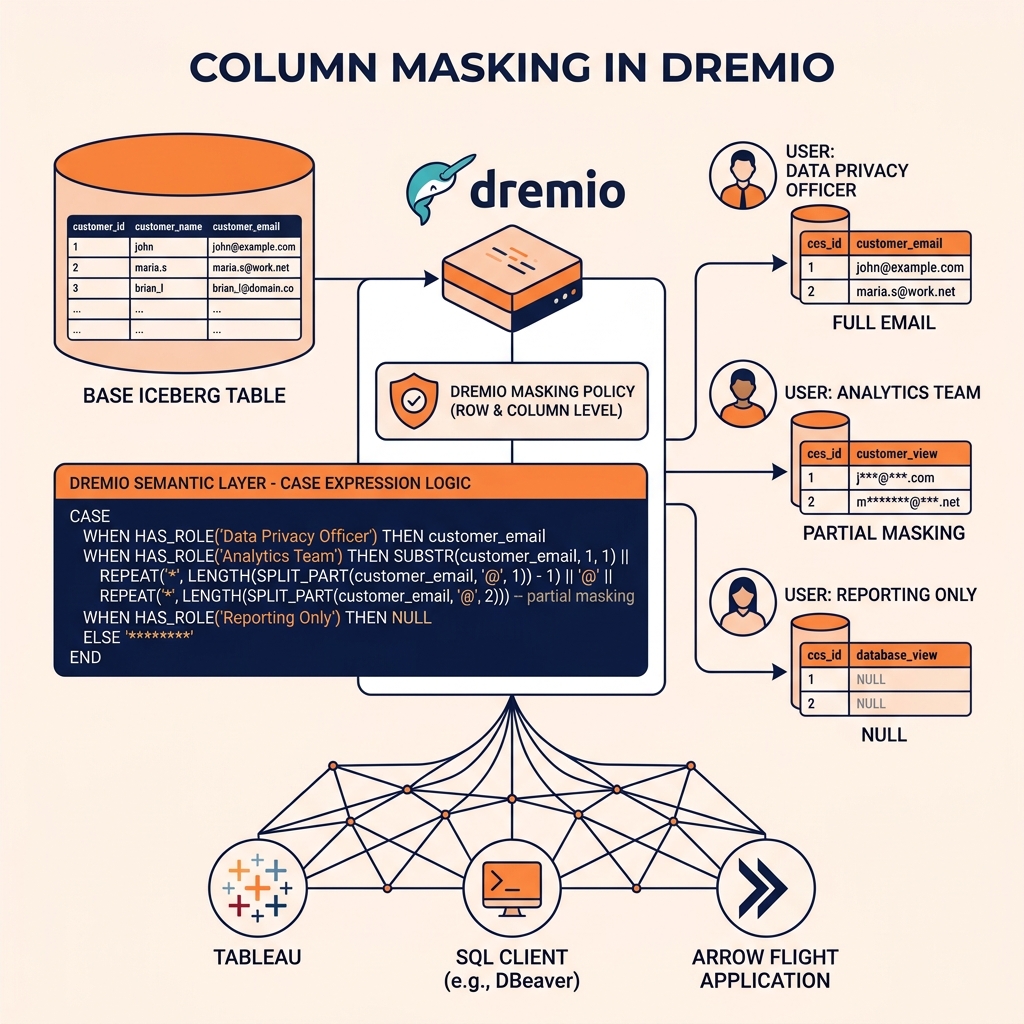
Column Masking in Dremio
Dremio implements column masking through its Semantic Layer’s row and column access control features. A column masking policy is defined on a Virtual Dataset column and references the querying user’s roles to determine which masking function to apply. The policy is expressed as a CASE expression: CASE WHEN IS_MEMBER('privacy_officers') THEN customer_email WHEN IS_MEMBER('analytics') THEN LEFT(customer_email, 1) || '***@***' ELSE NULL END.
This masking expression is automatically applied to every query against the Virtual Dataset, regardless of which tool the user uses (Tableau, Power BI, Jupyter notebook, direct SQL). The masking is transparent to the query: the user writes SELECT customer_email FROM customer_transactions and receives the masked value appropriate for their role, without any awareness that masking is being applied.
Dremio’s column masking integrates with its Arrow Flight query path, ensuring that data delivered through the high-performance Flight API is also subject to the same masking policies as data delivered through JDBC or the SQL UI.
Learn More
If you want the long-form version, start with the books by Alex Merced. For a faster pass, there are short video explainers.